


Harvest Right
4.7143.00 Reviews
App Specs
- Version
- 1.0.58
- Updated On
- License
- Free
- Downloads
- 10,000+
- Developer
- Harvest Right
- Categories
- House & Home
- Platform
- Android
Screenshots
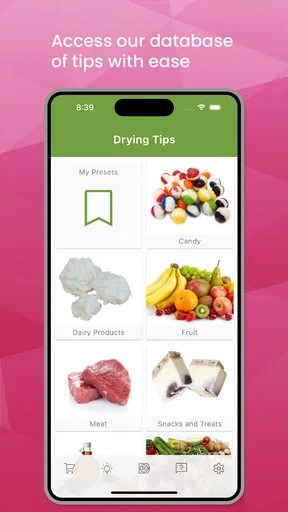
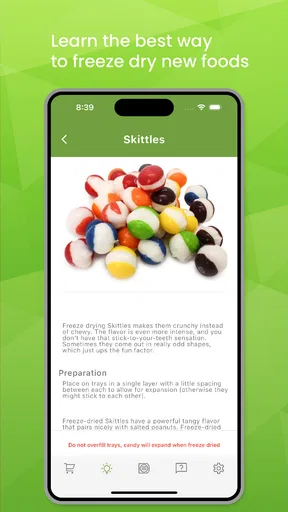
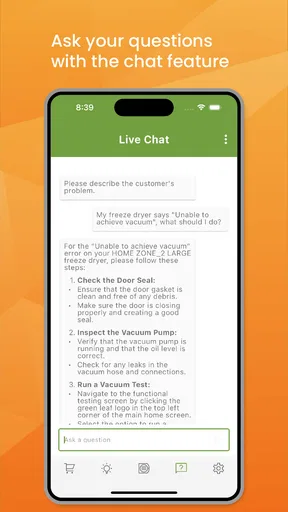
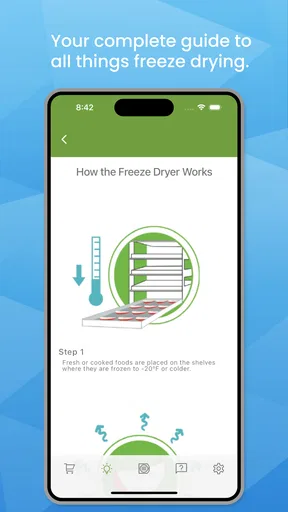
 Analysis by AppCompare
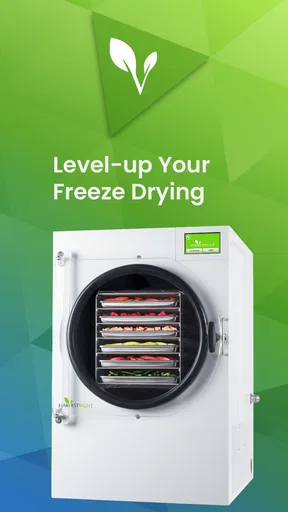
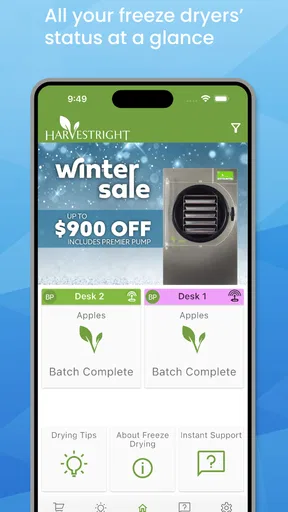
Harvest Right is a free House & Home app from Harvest Right that gives owners a direct way to work with their freeze dryer. I approached it less like a shopping companion and more like a practical control-room tool: the value depends on whether it makes an already hands-on preservation routine easier to follow, monitor, and fit around daily life.
My overall impression is positive, especially for people who regularly freeze-dry food and want their phone involved in the process. The app has a focused purpose rather than trying to become a general kitchen planner. That focus is useful, but it also means the experience is closely tied to owning a compatible Harvest Right freeze dryer. If you do not have the equipment, there is little reason to install it.
How the app feels when you need to manage a freeze-drying session
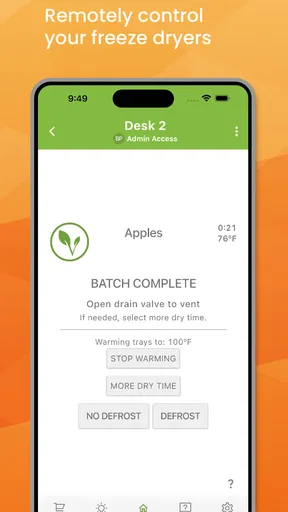
The first thing I noticed is that the app’s usefulness comes from reducing the need to keep returning to the machine. Freeze drying is not a quick task that can always be completed in one uninterrupted stretch. You may load trays, start a cycle, handle other chores, and come back later to check progress. A phone-based connection can make that routine less disruptive than repeatedly walking to the appliance.
That matters most in a busy home. Someone preparing food for long-term storage may also be caring for children, working from home, or moving between rooms. In that setting, direct access from a phone is more than a convenience feature. It can help the user keep the process in mind without making the appliance the center of the day.
I also like the way the app’s purpose is easy to understand. It is not trying to replace every part of freeze-drying knowledge. Instead, it acts as a companion to the equipment. That narrow role makes it easier to decide whether it belongs in your routine: if you want remote access and a more connected workflow, it is relevant; if you only want recipes, storage ideas, or general food-preservation education, it is not the right tool.
Readability and navigation in a practical home setting
For an app like this, clear navigation matters because users may open it with wet hands, while carrying ingredients, or while trying to check a process quickly. I found the focused purpose helpful. There are fewer reasons to wander through unrelated sections, and the central task remains connected to the freeze dryer rather than buried under lifestyle content.
The design is best understood as an equipment companion, not a detailed reference manual. I would not rely on it alone to teach a first-time owner every principle of freeze drying. A new user still benefits from learning about preparation, tray loading, packaging, moisture, and safe handling separately. The app can support the machine-centered part of the workflow, but it should not be treated as a substitute for understanding the process.
Worth Reading Before You Choose

EA SPORTS FC Mobile 26 Is a Bigger Football Game, but It Takes Time

Flipboard Shows What News Apps Must Do Beyond the Feed

Switching to Android Auto Means Rethinking Your Driving Routine

Google Calendar Makes a Crowded Week Easier to Manage

Ludo King Makes the Most of the Minutes Between Plans

Baby Panda World Brings Quick Play to Modern Phones, but Its Game Library Feels Busy
That distinction is important for readability. A short status or control screen can be easier to understand than a crowded dashboard, but it may also leave experienced users wanting more context. If you prefer seeing extensive history, detailed comparisons, or a large library of guidance in one place, a dedicated notebook or spreadsheet may still be better for record keeping.
My practical tip is to decide before starting a batch what information you actually need to check from your phone. If your goal is simply to avoid unnecessary trips to the appliance, the app’s focused approach makes sense. If you want to document every ingredient, weight, drying result, and packaging decision, keep a separate log. That two-part workflow is more realistic than expecting one app to handle the entire preservation project.
Motor and sensory considerations during everyday use
The strongest inclusive benefit is the possibility of checking the freeze dryer without having to stand directly beside it every time. For users with limited stamina, balance concerns, joint pain, or difficulty moving repeatedly between rooms, that can remove a small but meaningful physical burden. It may also help someone who cannot comfortably bend, reach, or remain near the appliance for long periods.
This does not make the whole process physically effortless. Loading trays, removing food, inspecting texture, cleaning surfaces, and packaging the finished product remain hands-on jobs. The app can reduce some checking, but it cannot eliminate the physical work involved in preparing and finishing a batch. I would describe it as a useful adjustment for the monitoring stage, not a complete accessibility solution.
Sensory needs also deserve a realistic view. A phone interface can be preferable to relying on sounds from an appliance, particularly in a noisy kitchen or for someone who does not consistently notice audible alerts. At the same time, I would not assume that every important event can be understood without looking at the screen. Users who depend on visual alternatives should test the app in their own environment and make sure they can recognize the information they need.
People with low vision may find a phone more adaptable than a distant appliance display because the phone can be held closer and used in a familiar viewing position. However, comfort depends on the actual text size, contrast, layout, and operating-system settings. I would use the device’s built-in display adjustments where available, but I would not promise that every screen will respond perfectly to them.
For users with limited dexterity, the app may reduce the number of physical interactions with the machine, which is a genuine advantage. Still, starting a session, handling food, and managing packaging can require careful hand movements. A helper may still be needed for those stages. The best use is therefore selective: use the app to reduce avoidable trips and checks, while planning assistance for the parts that remain manual.
Situational access: where the app earns its place
The clearest everyday scenario is a household running a batch while normal life continues around it. I might prepare food in the evening, start the process, and then move on to dinner, work, or sleep. Rather than repeatedly interrupting those activities just to inspect the machine, I can use the phone as the first point of contact. That does not remove the need for attention, but it makes attention easier to schedule.
Another useful situation is a home where the freeze dryer is located away from the main living area. A basement, utility room, garage, or separate work space can make frequent checking inconvenient. The app is more valuable there than it would be for someone standing beside the appliance in a small kitchen. Distance is one of the practical problems this kind of companion app is designed to address.
It can also help households with different responsibilities. One person may load the machine while another keeps an eye on the session. Shared awareness can make the routine less dependent on one individual remembering every check. I would still agree on who is responsible for the physical steps, because phone access does not automatically solve communication or handoff problems.
For users with sensory sensitivities, checking from another room may be more comfortable than spending extended time near kitchen noise, heat, odors, or appliance activity. Again, the benefit is situational rather than universal. The app can change where you monitor the process, but it cannot change the conditions you encounter when loading, unloading, or cleaning.
Travel and remote use require a more cautious approach. I would not treat phone access as permission to leave a running appliance unattended for long periods or assume that a notification replaces responsible supervision. The app can make monitoring more convenient, but safe use still depends on the owner’s judgment, the equipment, and the circumstances of the home.
What it does better than the usual alternatives
The usual alternative is simply walking to the freeze dryer and checking it at the appliance. That approach is dependable and does not require learning another interface, but it is inconvenient when the machine is in another room or when the user has mobility limitations. Harvest Right’s app adds value by putting the equipment relationship closer to the user’s normal phone habits.
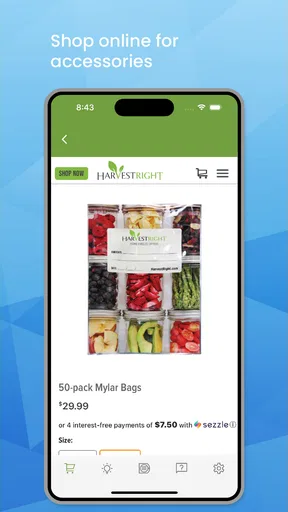
Another alternative is keeping a paper log or using a general notes app. Those tools are useful for recording ingredients, dates, observations, and packaging results, but they do not provide the same direct connection to the appliance. I would use a notes app alongside this one rather than instead of it. The dedicated app is for access to the machine; the note-taking tool is for personal history and repeatable recipes.
A general smart-home dashboard may look attractive if you already manage many connected devices, but a broad dashboard can make a specialized task harder to find. The Harvest Right approach is more relevant when the freeze dryer is the main concern. The trade-off is that it is not a universal home-automation solution, so people who want one central control system for every appliance may prefer a different setup.
In my view, the app is most successful when judged against repeated trips to the appliance, not against a full food-preservation management platform. That is a narrower comparison, but it is the fair one. Its strength is directness; its weakness is that users may still need separate tools for planning, education, inventory, and batch records.
Remaining barriers and points of friction
The largest barrier is equipment dependence. This is not a general-purpose app for anyone curious about freeze drying. It makes sense primarily for Harvest Right owners, and even then, the usefulness depends on the relationship between the phone, the appliance, and the home environment. Someone considering it should think about the whole setup rather than judging the app in isolation.
There is also a learning curve that comes from the process itself. A user can understand the app and still feel uncertain about food preparation, cycle decisions, dryness, packaging, or storage. That is not necessarily a flaw in the software, but it affects the total experience. I would not recommend buying or operating a freeze dryer solely because a companion app appears convenient.
Connectivity can become a practical weak point for anyone whose appliance is far from the router or whose home network is unreliable. When the phone is not communicating properly, the user may need to return to the machine and troubleshoot the situation directly. That can be especially frustrating for someone who adopted the app specifically to avoid unnecessary movement.
Notifications and remote status are helpful only when they are understandable and timely enough for the user’s needs. I would avoid building a critical routine around a single alert. A better habit is to use the app for convenience while keeping a personal reminder or schedule for important checks. This is particularly sensible for users who may miss visual cues, have inconsistent notification attention, or share the phone with others.
There is a broader accessibility limitation too: remote access does not guarantee that every user can operate the entire workflow independently. Physical loading and unloading, screen readability, touch accuracy, and the need to interpret what the machine is doing can still create barriers. I appreciate the app more when I view it as one helpful layer in an inclusive setup, not as proof that the complete system works equally well for every ability.
Who should use it, and who should skip it
I would recommend it to Harvest Right owners who run batches often, keep the machine in a separate area, or want to reduce repeated checks. It is also worth considering for households where one person needs to monitor the process from a more comfortable location. The free price removes the financial hurdle of trying it, and the Everyone age rating makes it broadly suitable as a household utility.
I would be more cautious if you only freeze-dry occasionally and already keep the appliance within easy reach. In that case, the extra app may not change your routine enough to justify another connected tool. I would also suggest skipping it if what you really want is a recipe collection, a pantry inventory, or a complete record of every batch. A general notes system or dedicated food-preservation tracker may serve those needs better.
Users who dislike phone-dependent appliances should think carefully before adopting it. The app can add convenience, but it also introduces another interface and another point where technology may become part of a task that used to be completely physical. For some people, that is helpful; for others, it feels like unnecessary complexity.
Version, trust, and the long-term impression
The app was released on August 9, 2024, and its current version is 1.0.58. It requires Android 7.0 or later, so owners of older Android devices should check compatibility before planning around it. On the store, it holds a 4.7 average from over eight hundred ratings, with more than one hundred reviews and over ten thousand installs. Those figures suggest a meaningful user base, while still leaving room for individual experiences to vary.
I also appreciate that the app is free. There is no purchase decision to make before discovering whether it fits your freeze-drying routine. The more important investment is the equipment and the time involved in using it responsibly, not the app itself. That makes testing the software a sensible step for existing owners.
My advice is to judge it after a complete cycle rather than after a quick launch. Notice whether checking the phone genuinely saves movement, whether the information is easy for you to interpret, and whether it works comfortably in the room where you normally prepare food. Try it during a busy day, not only under ideal conditions. That is when the difference between a useful companion and an unnecessary extra becomes clear.
An inclusive verdict for real households
Harvest Right is most valuable as a focused access layer between the owner and the freeze dryer. It can make monitoring less dependent on physical proximity, which is meaningful for users with limited mobility, low stamina, busy schedules, or a machine placed away from the kitchen. Its focused role also makes it easier to understand than a crowded all-purpose home app.
At the same time, I would not oversell what it changes. The physical preparation, unloading, cleaning, and packaging remain. Screen-based access may help one part of the routine while leaving other barriers untouched. Users with visual, hearing, motor, or cognitive needs should evaluate the actual interaction in their own home rather than assuming that remote control equals complete independence.
After using it as a practical companion, I see it as a worthwhile free addition for existing Harvest Right owners, particularly when distance and repeated checking are genuine problems. It is not the best choice for people seeking education, recipes, inventory management, or a universal smart-home hub. For the right household, though, it can turn freeze-dryer monitoring from a series of interruptions into a more manageable part of the day.
If I were recommending it to a friend, I would say this: install it when you already own the equipment and want a simpler way to stay connected to a batch. Keep a separate record for your food and results, maintain sensible hands-on supervision, and test the interface with your own accessibility needs in mind. Used that way, Harvest Right feels practical rather than flashy, and its strongest benefit is the small amount of independence it can add to an otherwise demanding household task.
Pros
- Simple controls make freeze-drying tasks easy to manage.
- Useful for preserving garden produce
- meals
- and emergency food supplies.
- Food retains much of its original shape
- flavor
- and nutrients.
- Suitable for both small households and serious food-preparation needs.
- Stored food is lightweight and convenient for travel or long-term use.
Cons
- The machine requires significant counter or floor space.
- Initial purchase cost is high compared with other preservation methods.
- Freeze-drying cycles can run for many hours.
- The vacuum pump may produce noticeable noise during operation.
- Mylar bags
- oxygen absorbers
- and other supplies add ongoing costs.
FAQs for Harvest Right
What is Harvest Right, and what does the app do?
Harvest Right is primarily a brand of home and commercial freeze dryers rather than a standalone mobile game or typical utility app. Its ecosystem may include digital resources, product information, manuals, recipes, and support for operating a freeze dryer. The equipment removes moisture from food through freezing and vacuum drying, helping preserve meals, fruits, vegetables, dairy products, and other suitable items for long-term storage.
Can I use Harvest Right without owning a freeze dryer?
You can usually browse Harvest Right information, recipes, guides, product details, and support resources without owning one of the company’s machines. However, the practical benefits are aimed at freeze-dryer owners or people considering a purchase. Any monitoring, setup, troubleshooting, or operating features connected to the equipment may require a compatible Harvest Right unit, an account, and an appropriate internet or device connection.
Is Harvest Right easy for beginners to use?
Harvest Right equipment is designed for home users, but it is not completely automatic in the same way as a simple kitchen appliance. Beginners need to prepare food correctly, avoid overloading trays, select suitable settings, monitor the cycle, and package the finished product in moisture-proof containers. The available guides and recipes can make the learning process easier, although the first few batches may require patience and adjustment.
What foods can be processed with Harvest Right?
A Harvest Right freeze dryer can process many foods, including fruits, vegetables, cooked meals, meat, fish, dairy products, desserts, and some ingredients used for emergency storage or camping. Results depend on preparation, portion size, fat content, and moisture levels. Foods should be cut into suitable pieces and handled safely before and after processing. High-fat foods may have a shorter storage life than low-fat foods.
What should I know about cost, maintenance, and safety before downloading or using Harvest Right resources?
The application or online resources may be free to access, but using Harvest Right equipment involves a significant purchase and continuing costs for electricity, packaging materials, oxygen absorbers, cleaning, and possible maintenance. Users should read the official instructions carefully, place the machine in a suitable ventilated area, and follow food-safety practices. Downloading guides or support tools does not replace the manufacturer’s operating and safety instructions.


